
Threads has quickly become a busy place for short posts, conversations, reactions, photos, and videos. Since its launch, the platform has given users a simple way to join public discussions while sharing media with their followers and wider audiences. Meta describes Threads as an app built by the Instagram team for sharing text updates and joining public conversations, with support for photos and videos. As video content continues to appear across the platform, many users search for a Threads Video Downloader when they want to save a public clip for later viewing.
Saving a Threads video can be useful when you want to keep your own content, watch a public clip offline, or preserve material you have permission to use. However, Threads does not offer the same kind of straightforward save-to-device workflow that users may expect from a media gallery. Third-party browser tools have therefore become common for public posts. These services usually ask you to copy a Threads post link, paste it into their website, and select an available media file. The key is knowing what these tools can access and what you should avoid.
What Is a Threads Video Downloader?
A Threads Video Downloader is generally a third-party website or application designed to save video content from publicly accessible Threads posts. Most browser-based services do not require users to install dedicated software. Instead, they process a Threads post URL and display media options when the post can be accessed.
The available format and quality can depend on the original post and the downloader itself. Some current services advertise MP4 downloads, while others may also support photos or GIF-style media. These tools are independent services, so users should not assume that a downloader is owned, operated, or officially endorsed by Meta.
Does Threads Have a Built-In Video Download Button?
Threads provides tools for sharing, reposting, quoting, and copying links, but third-party downloader sites currently describe the platform as lacking a general save-to-device button for other users’ videos. This is why external browser tools appear frequently in searches for Threads video downloads.
The absence of a native download option does not mean every public video should automatically be copied. A public post can still contain copyrighted material or personal content. Public visibility means the post can be viewed, but it does not automatically transfer ownership or reuse rights to everyone who sees it.
How Does a Threads Video Downloader Work?
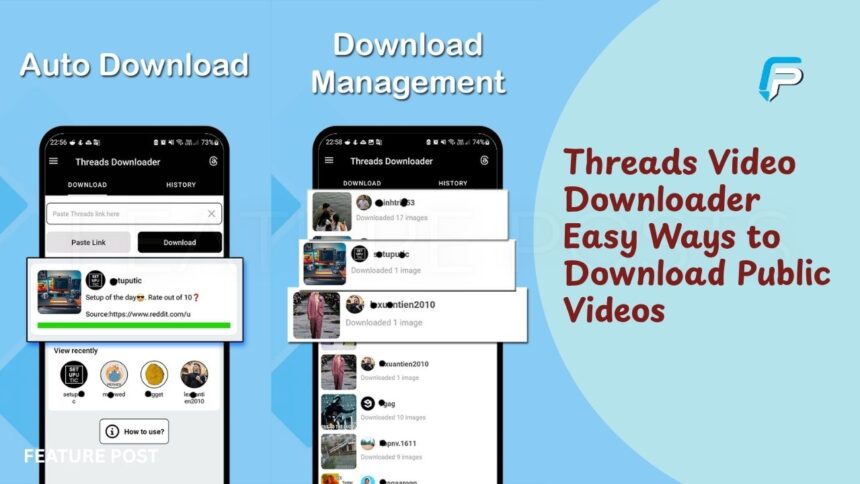
Most browser-based downloaders follow a simple link-based process. You first open the Threads post containing the video and copy its URL. You then paste that link into the downloader’s input box and ask the service to load the available media.
If the post is supported and publicly accessible, the service may display one or more downloadable files. Current downloader services describe this process as reading media associated with a public post and presenting available options through the browser. The exact process can vary between services, and a download may fail if the post has been deleted, restricted, or changed.
How to Download a Public Threads Video
The basic process is relatively simple. Open Threads and find the public post containing the video you want to save. Tap the share option and select the command for copying the post link. On desktop, you can also copy the URL from the browser address bar.
Next, open a reputable browser-based Threads downloader and paste the post link into its search or download field. Select the option to load or process the video. If the service finds an available file, choose the download option and follow your browser’s normal saving process. Current services describe this as the standard workflow for supported public posts.
Threads Video Downloader on iPhone
iPhone users can usually perform the process through Safari without installing a separate downloader application. Start by opening the Threads app and locating the public video you want to save. Use the share menu to copy the post link, then open Safari and visit the browser-based downloader you have chosen.
Paste the URL and process the post. If a video file becomes available, Safari may download it into the Files app rather than placing it directly into Photos. Current downloader instructions note that iOS can require an additional save step through the Share menu or Files app. The exact behavior can change with iOS and Safari updates.
Threads Video Downloader on Android
Android users can follow a similar process using Chrome or another supported browser. Copy the public Threads post link, open the downloader, and paste the URL into the provided field. After the service processes the link, select the available video file and start the download.
In many Android setups, downloaded files appear in the browser’s Downloads folder. The exact location depends on your phone, browser, and storage settings. Some current downloader services specifically describe their tools as mobile-friendly and usable across Android devices without requiring a dedicated application.
Key Takeaways
- A Threads Video Downloader is generally a third-party tool for saving media from public Threads posts.
- Most browser-based tools require you to copy and paste the direct Threads post URL.
- Private, deleted, or restricted posts should not be accessed through downloader tools.
- Available video quality depends on the media made available from the original post.
- Downloading a video does not automatically give you permission to repost or monetize it.
Download Threads Videos on a Computer
Downloading on a Windows or Mac computer can be even simpler because browsers provide direct access to downloaded files. Open Threads in your browser, navigate to the public post, and copy its URL. You can then paste that link into a browser-based downloader.
If the post contains a supported video, the service may display an MP4 or another available media option. After selecting it, your browser normally places the file in its default Downloads folder. The actual resolution and file type depend on what the source post makes available and what the downloader can process.
Can You Download HD Threads Videos?
Some Threads downloader services advertise HD, Full HD, or other quality options. However, a downloader cannot create genuine detail that was not present in the original media. The quality you receive depends largely on the version of the video that Threads makes available.
For example, if the source only provides a lower-resolution version, choosing a website that claims to offer a higher number does not necessarily mean you will receive genuine higher-quality footage. Current downloader documentation also notes that available resolutions depend on the submitted post. It is better to choose the highest legitimate option actually provided.
Can You Download Private Threads Videos?
A responsible Threads Video Downloader should not bypass private accounts, login restrictions, or other access controls. Current downloader services explicitly state that their tools are intended for publicly accessible posts and cannot process private, deleted, or restricted content.
This distinction matters because privacy settings represent the creator’s intended audience. Trying to access a private video through an external service can cross an important privacy boundary. If a post is private or unavailable to you, the safer approach is to respect that restriction rather than searching for a tool that claims to bypass it.
Are Threads Video Downloaders Safe?
Safety depends on the individual website. Because many Threads downloaders are independent services, users should examine a site carefully before interacting with it. A downloader should not need your Threads or Instagram password simply to process a public post URL.
Be particularly careful with websites that display fake download buttons, unexpected redirects, excessive pop-ups, or requests to install unfamiliar software. Keeping your browser and device security features updated can reduce unnecessary risks. If a site asks for account credentials or permissions that do not make sense for a simple public URL download, leaving the site is a sensible precaution.
Threads Video Downloader Without an App
One reason browser-based downloaders attract attention is that they can work without installing an application. Users can copy a public Threads link, open a downloader in a browser, paste the URL, and save the available file.
This approach can also reduce the number of permissions involved because you are not installing an additional application on your phone. Several current downloader services advertise browser-based access across iPhone, Android, Windows, and Mac. However, users should still evaluate the website itself before downloading anything.
Why Some Threads Videos Cannot Be Downloaded
A downloader may fail even when a Threads post appears to contain a video. The post could be private, deleted, restricted, unavailable, or unsupported by the particular service. A temporary problem with Threads or the downloader can also prevent the media from loading.
Another common issue occurs when users paste the wrong link. A profile URL, search page, or incomplete share link may not identify a specific media post. Current downloader instructions recommend using the direct link to the individual Threads post rather than a general profile or search URL.
Threads Video Downloads and Copyright
Downloading a public video does not automatically give you permission to republish it. The creator may own the video, or the content may contain music, footage, images, or other material controlled by separate rights holders.
If you want to repost a video on Instagram, TikTok, YouTube, a website, or another platform, consider whether you have permission or another legal basis for using it. Giving credit can be helpful, but credit alone does not necessarily replace permission. Current downloader guidance also warns that public availability does not itself grant rights to reproduce, publish, distribute, or monetize content.
Best Uses for a Threads Video Downloader
A downloader can have legitimate uses when you have the necessary rights to save the content. For example, creators may want to keep copies of their own public posts. Someone may also save a public video for personal reference when the creator permits that use.
Researchers, editors, or social media managers may have additional reasons to archive public material, but their use should still follow applicable copyright and platform rules. The safest approach is to distinguish between saving a file and having permission to reuse it. These are separate questions, and downloading a video does not answer the second one.
How to Choose a Threads Video Downloader
When evaluating a downloader, look for a straightforward interface that explains what the service supports. A useful tool should clearly state that it works with public content and should not claim to bypass private accounts or restricted posts.
It is also worth checking whether the service requires an account, requests unnecessary permissions, or pushes users toward unfamiliar software. Avoid giving your Threads or Instagram login details to a downloader simply to process a public link. The fewer unnecessary credentials and permissions involved, the easier it is to limit your exposure.
Conclusion
A Threads Video Downloader can provide a convenient way to save videos from publicly accessible Threads posts when the content is available and you have the right to download it. The typical process involves copying the individual post URL, pasting it into a browser-based service, checking the available media, and saving the resulting file. Current tools commonly support browser-based downloads on phones and computers.
However, downloading a public video does not make the content yours. Private posts should not be bypassed, and downloaded videos should not automatically be reposted or monetized. Always consider privacy, copyright, security, and the creator’s rights before using saved content. With those points in mind, public Threads video downloads can be handled more carefully and responsibly.
Frequently Asked Questions
What is a Threads Video Downloader?
It is a third-party tool designed to help save videos from publicly accessible Threads posts.
Can I download a public Threads video without an app?
Yes, many browser-based downloader services work without requiring a separate application.
Can I download Threads videos on iPhone?
Yes, you can use a browser-based service, although iPhone may save the file through Safari’s Files system before you move it to Photos.
Can I download Threads videos on Android?
Yes, compatible browser-based tools can save supported public videos to an Android device.
Can I download private Threads videos?
You should not use a downloader to bypass private-account restrictions or access controls.
Does downloading a Threads video give me copyright ownership?
No, downloading a video does not transfer copyright ownership or automatically grant reuse rights.
More Updates from FEATURE POSTS